Platform Overview
Platform
Overview
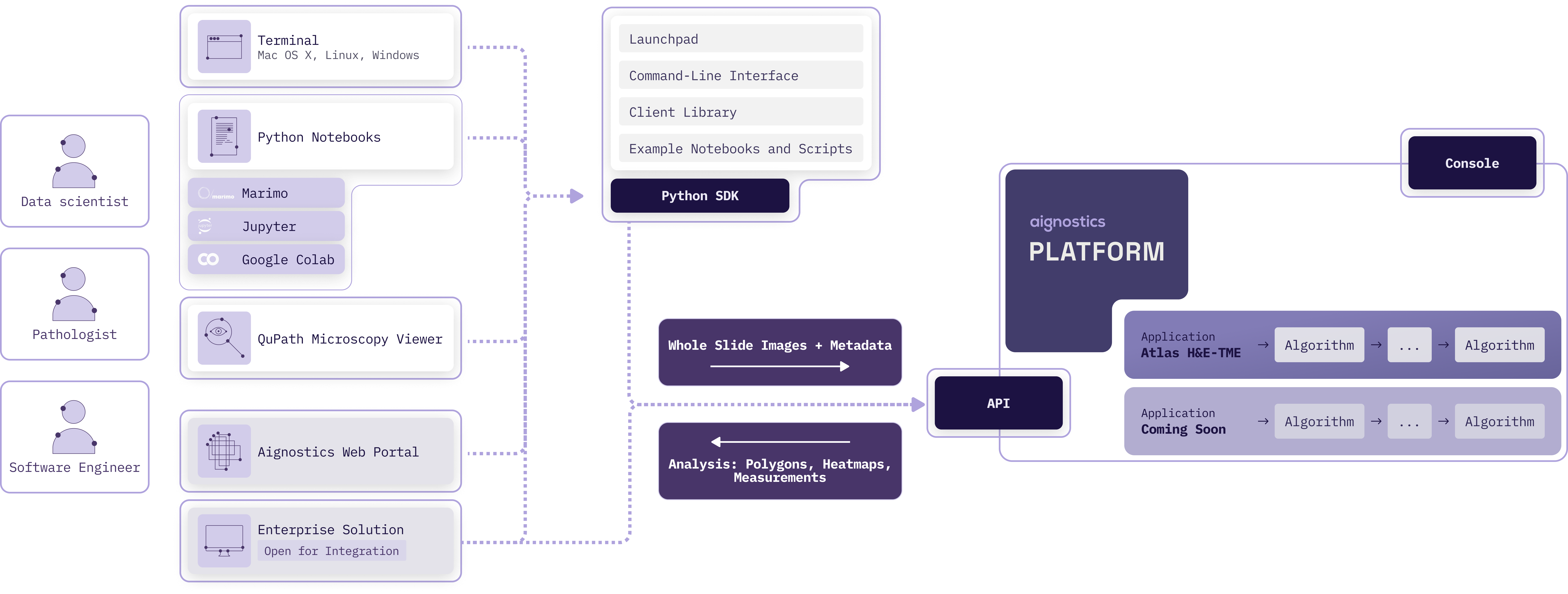
The Aignostics Platform is a comprehensive cloud-based service that allows organizations to leverage advanced computational pathology applications without the need for specialized expertise or complex infrastructure. Via its API it provides a standardized, secure interface for accessing Aignostics’ portfolio of advanced computational pathology applications. These applications perform machine learning based tissue and cell analysis on histopathology slides, delivering quantitative measurements, visual representations, and detailed statistical data.
Key Features
Aignostics Platform offers key features designed to maximize value for its users:
Run Aignostics applications: Run Aignostics advanced computational pathology applications like Atlas H&E-TME on your whole slide images (WSIs) and receive results in a easy to inspect formats.
Multiple Access Points: Interact with the platform via various pathways, from Aignostics Launchpad (desktop application for MacOS, Windows and Linux), Aignostics CLI (command-line interface for your terminal or shell scripts), Example Notebooks (we support Jupyter and Marimo), Aignostics Client Library (for integration with your Python codebase), or directly through the API of the Aignostics Platform (for integration with any programming language). Contact your business partner at Aignostics if you are interested to discuss a direct integration with your Imaging Management Systems (IMS) and Laboratory Information Management Systems (LIMS).
Secure Data Handling: Maintain control of your slide data through secure self-signed URLs. Results are automatically deleted after 30 days, and can be deleted earlier by the user.
High-throughput processing with incremental results delivery: Submit up to 500 whole slide images (WSI) in one batch request. Access results for individual slides as they completed processing, without having to wait for the entire batch to finish.
Standard formats: Support for commonly used image formats in digital pathology such as pyramidal DICOM, TIFF, and SVS. Results provided in standard formats like QuPath GeoJSON (polygons), TIFF (heatmaps) and CSV (measurements and statistics).
Registration and User Access
To start using the Aignostics Platform and its advanced applications, your organization must be registered by our business support team:
Access to the Aignostics Platform requires a formal business agreement. Once an agreement is in place between your organization and Aignostics, we proceed with your organization’s registration. If your organization does not yet have an account, please contact your account manager or email us at support@aignostics.com to express your interest.
To register your organization, we require the name and email address of at least one employee, who will be assigned the Administrator role for your organisation. Your organisation’s Administrator can invite and manage additional users.
[!Important]
All user accounts must be associated with your organization’s official domain. We do not support the registration of private or personal email addresses.
For security, Two-Factor Authentication (2FA) is mandatory for all user accounts.
We can integrate with your IDP system (e.g. SAML, OIDC) for user authentication. Please contact us to discuss the integration.
Registering your organistation typically takes 2 business days depending on the complexity of the signed business agreement and specific requirements.
Console
The web-based Aignostics Console is a user-friendly interface that allows you to manage your organization, applications, quotas, and users registered with the Aignostics Platform.
The Console is available to users registered for your organisation to manage their profile and monitor usage of their quota.
Administrators of your organization can invite additional users, manage the organisation and user specific quotas and monitor usage.
Both roles can trigger application runs.
Applications
An application is a fully automated advanced machine learning based workflow composed of one or more specific tasks (e.g. Tissue Quality Control, Tissue Segmentation, Cell Detection, Cell Classification and predictive analysis). Each application is designed for a particular analysis purpose (e.g. Tumor Micro Environment analysis or biomarker scoring). For each application we define input requirements, processing tasks and output formats.
As contracted in your business agreement with Aignostics your organisation subscribes to one or more applications. The applications are available for your organization in the Aignostics Platform. You can find the list of available applications in the Console of the Aignostics Platform.
Each application can have multiple versions. Please make sure you read dedicated application documentation to understand its specific constraints regarding acceptable formats, staining method, tissue types and diseases.
Once registered to the Platform, your organization will automatically gain access to the “Test Application”. This application can be used to configure the workflow and to make sure that the integration works correctly.
Application run
To trigger the application run, users can use the Aignostics Launchpad, Aignostics CLI, Example Notebooks, our Client Library, or directly call the REST API. The platform expects the user payload, containing the metadata and the signed URLs to the whole slide images (WSIs). The detailed requirements of the payload depend on the application and are described in the documentation, and accessible via the Info button in the Launchpad, as well as via the CLI and /v1/applications endpoint in the API.
When the application run is created, it can be in one of the following states:
received: the application run received from the client
scheduled: the application run request is valid and is scheduled for execution
running: the application run execution started
completed: the application run execution is done and all outputs are available for download
completed: the application run execution is done, but some items end up in the failed state
rejected: the application run request is rejected before it is scheduled
cancelled by the system: the application run failed during the execution with the number of errors higher than the threshold
cancelled by the user: the application run is cancelled by the user before it is finished
The status and operations of an application run are private to the user who triggered the run.
Results
When the processing of whole slide image is successfully completed, the resulting outputs become available for download. To assess specifics of application outputs please consult our application specific documentation, which you can find in the Console. Please note that you access to documentation is restricted to those applications your organisation subscribed to.
Application run outputs are automatically deleted 30 days after the application run has completed. However, the owner of the application run (the user who initiated it) can use the API to manually delete outputs earlier, once the run has reached a final state - completed, cancelled by the system or cancelled by the user. The Launchpad and CLI provide enable to delete results with one click resp. command.
Quotas
Every organization has a limit on how many WSIs it can process in a calendar month. The following quotas exist:
Per organization: as defined in your business agreement with Aignostics
Per user: defined by your organization Admin
When the per month quota is reached, an application run request is denied.
Other limitations may apply to your organization:
Allowed number of users an organization can register
Allowed number of images user can submit per application run
Allowed number of parallel application runs for the whole organization
Additionally, we allow organization Admin to define following limitations for its users:
Maximum number of images the user can process per calendar month.
Maximum number of parallel application runs for a given user
Visit the Console to check your current quota and usage. The Console provides a clear overview of the number of images processed by your organization and by each user, as well as the remaining quota for the current month.
API
The Aignostics Platform API is a RESTful web service that allows you to interact with the platform programmatically. It provides endpoints for submitting whole slide images (WSIs) for analysis, checking the status of application runs, and retrieving results.
You can interact with the API using the Python client, which is a wrapper around the RESTful API. The Python client simplifies the process of making requests to the API and handling responses. It also provides convenient methods for uploading WSIs, checking application run status, and downloading results.
For integration with programming languages other than Python, you can use the RESTful API directly. The API is designed to be language-agnostic, meaning you can use any programming language that supports HTTP requests to interact with it. This includes languages like Java, Kotlin, C#, Ruby, and Typescript.
Cost
Every WSI processed by the Platform generates a cost. Usage of the “Test Application” is free of charge for any registered user. The cost for other applications is defined in your business agreement with Aignostics. The cost is calculated based on the number of slides processed. When an application run is cancelled, either by the system or by the user, only processed images incur a cost.
Read the API reference documentation or use our Interactive API Explorer to dive into details of all operations and parameters.